 Using
the options array to access elements within the list Using
the options array to access elements within the list
Using the above list as an example, with
values added in for each element:
<form name="George">
<p><select name="example" size="1">
<option value="1">choice1</option>
<option value="2">choice2</option>
<option value="3">choice3</option>
<option value="4">choice4</option>
</select></p>
</form>
JavaScript gives us access to the individual elements (choice1,
choice 2, choice 3 etc) by using the options array. An array is a series of
variables all with the same name, but with different index numbers. (More on
this in the future). This is, however, all you're need to know about arrays
to access selections.
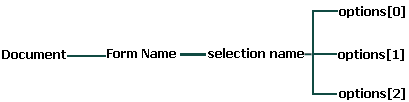
Ok, lets assume we want to access the first element of this selection
list:
document.George.example.options[0]
//gives us access to element "choice1"
This will give us direct access to the first element of the selection
list.
To access the third element, we would do this:
document.George.example.options[2]
//gives us access to element "choice3"
And to access the final element, we would do this:
document.George.example.options[3]
//gives us access to element "choice4"
It doesn't take a rocket scientist to realize that the number inside the
[ ] are always "1" minus the actual position of the element in the list. ALL
ARRAYS BEGIN WITH INDEX NUMBER "0", NOT "1"
So, now that we know the way to get to these little rats, lets see some
properties we can use with them:
Properties of the elements of the options
array
| properties |
description |
| text |
returns the actual text (name) of the element |
| value |
returns the value of the element |
Lets say we want to alert the name of the first
element (in this case, the name is "choice1"):
onClick="alert(document.George.example.options[0].text)"
And lets say we want to know the value that's associated
with this element:
onClick="alert(document.George.example.options[0].value)"
I know selection lists are a mess, but that's the way they are
accessed...
We now know how to access each of the elements within the selection
list...but only by hard-coding the index number into the script. For
example, we still have no way of telling our script to alert the value of
each element, depending on what he/she has selected. We will now proceed to
learn how we can have scripts automatically update itself whenever a
different selection is made by the user, and see some practical uses of
this.
|


